
OTT Navigator IPTV1.6.9.4 - Google Play
You'll be able to see results in few seconds.
Publisher Description

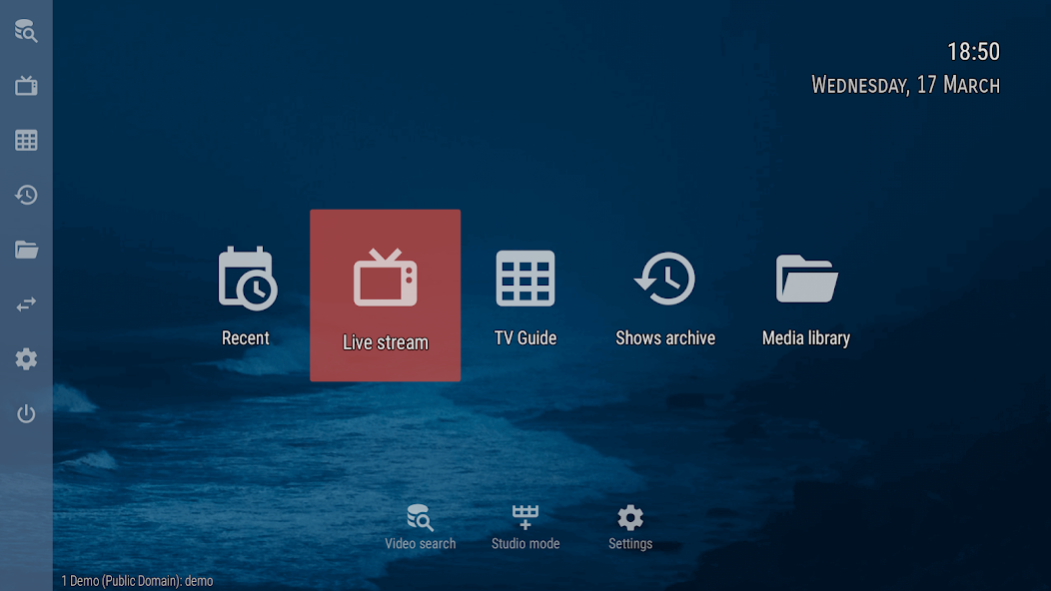


View your provider IPTV on any device (phone, tablet, TV, TV-box)
* Does not provide any video by itself. Works with your provider playlist or another source provided by you *
Live streams:
- live TV watching
- groups favorite channels and categories automatically
- start playing last channel on launch
- timeshift support for providers with archives
- PiP picture-in-picture mode (and studio mode for watching multiple streams)
- reminds interesting shows
Archive/Catch-up:
- watch archived shows and media library
- filters by channels, categories, genres, seasons, years, favorite channels, age, country...
- search by anything
- retrieves data from several EPG sources (including user-provided)
- saving playback progress with automatic resume from previous moment
- playback speed
Network:
- browse and play local network files via UPnP/DNLA
- media library
And lots more, including AFR support, DRM support, recommendations, etc!
About OTT Navigator IPTV
The company that develops OTT Navigator IPTV is SIA Scillarium Studio. The latest version released by its developer is 1.6.9.4.
To install OTT Navigator IPTV on your Android device, just click the green Continue To App button above to start the installation process. The app is listed on our website since 2023-07-28 and was downloaded 3 times. We have already checked if the download link is safe, however for your own protection we recommend that you scan the downloaded app with your antivirus. Your antivirus may detect the OTT Navigator IPTV as malware if the download link to studio.scillarium.ottnavigator is broken.
How to install OTT Navigator IPTV on your Android device:
- Click on the Continue To App button on our website. This will redirect you to Google Play.
- Once the OTT Navigator IPTV is shown in the Google Play listing of your Android device, you can start its download and installation. Tap on the Install button located below the search bar and to the right of the app icon.
- A pop-up window with the permissions required by OTT Navigator IPTV will be shown. Click on Accept to continue the process.
- OTT Navigator IPTV will be downloaded onto your device, displaying a progress. Once the download completes, the installation will start and you'll get a notification after the installation is finished.
Program Details
System requirements
Download information
Pricing
Version History
version 1.6.9.4
posted on 2023-07-28
version 1.6.5.5
posted on 2021-03-17
- New multi-column layout optimized for remote controller
- More options on player interface and menu visuals
- Media library: automatic recently added filter
- Improved folding duplicate channels
- Optimized for huge lists
- Pin category to the main screen
- Manual adding stream link
- More themes
- And lots lots more
version 1.6.3.8
posted on 2021-02-12
- EPG loading is way much faster and more stable
- Caching provider channels for fast startup even while loading data
- Night mode
- Support for DVB subtitles
- And tons of other improvements
version 1.6.1.8
posted on 2020-09-12
Chromecast support
Better support for Stalker/Xtream Codes
Better DRM support (Widevine)
Builtin VOD/Series player improvements
version 1.5.9.5
posted on 2020-03-17
Improved support for MAC-based portals
Support added for user provided media library (xml, json)
TV-guide now supports horizontal scrolling (remote) and supports huge categories better
Auto-fold channel duplicates option
Android TV channel for favorite/suggested media library items
version 1.5.8.6
posted on 2020-02-19
- More options for Android TV
- Sleep timer
- Custom timezone (time warp mode)
- Media library (configure unlimited sources; favorites category)
- Fold similar channels
- And lots more
version 1.5.7.2
posted on 2020-01-12
- more tight integration with Android TV
- improvements in PiP (picture-in-picture) mode
- media library redesign with different sort modes
- studio mode improvements
- home screen buttons
- configure swipe actions (touch)
version 1.5.5.4
posted on 2019-11-15
- media library redesign with different sort modes
- studio mode improvements
- home screen buttons
- map icons from local folder
- configure swipe actions (touch)
- video scaling support for tall devices
version 1.5.4.2
posted on 2019-10-13
- auto enter system pip on switching to home screen (premium)
- configurable double tapping zones in playback
- subtitles support for hardware codecs
- afr supports resolution change
- allow configuring local folder with icons
- allow using software audio decoding for hardware codecs (can help with 5.1 sound on devices that does not support it)
- storage optimizations
version 1.5.2.4
posted on 2019-08-02
- studio mode (watch up to 9 streams at the same time, premium)
- favorite channels on home screen (android tv)
- easy channel reordering (premium)
- restrict channels with code
- restrict max connections per provider
Disclaimer
Official Google Play Link
We do not host OTT Navigator IPTV on our servers. We did not scan it for viruses, adware, spyware or other type of malware. This app is hosted by Google and passed their terms and conditions to be listed there. We recommend caution when installing it.
The Google Play link for OTT Navigator IPTV is provided to you by apps112.com without any warranties, representations or guarantees of any kind, so access it at your own risk.
If you have questions regarding this particular app contact the publisher directly. For questions about the functionalities of apps112.com contact us.
